
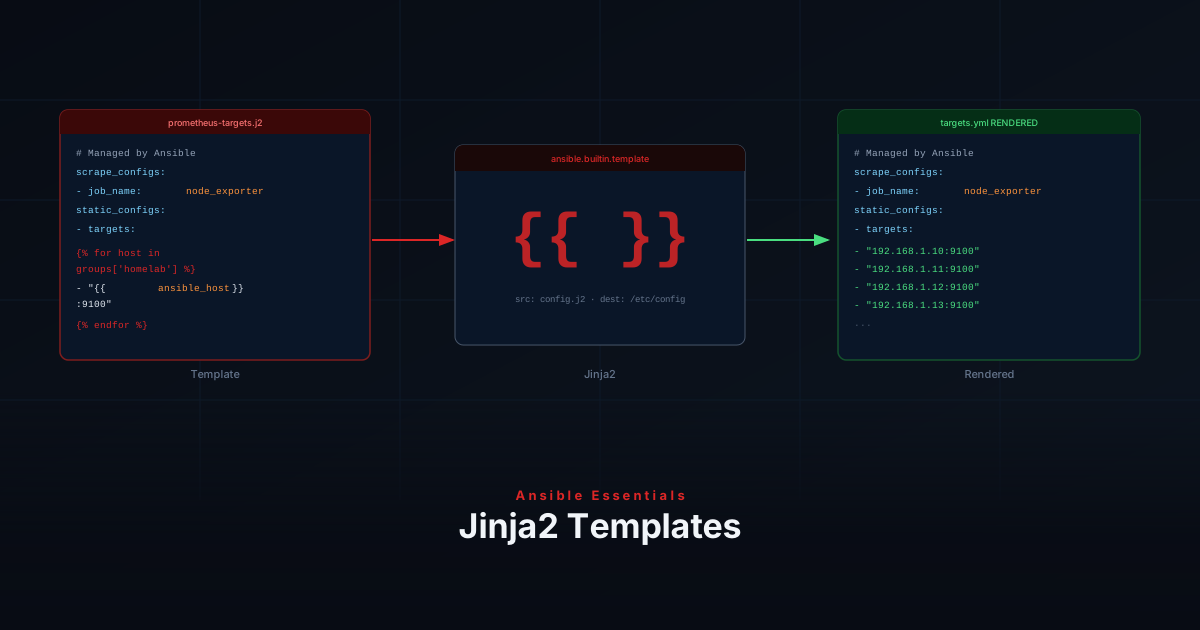
Hardcoding values in config files works for one host — but when you manage ten servers with slightly different settings, you end up maintaining ten nearly identical files. Jinja2 templates let you write a single file with placeholders that Ansible fills in per host at deploy time.
Template Syntax
Templates are plain text files ending in .j2 with three main expressions:
| Syntax | Purpose |
|---|---|
{{ variable }} | Insert a variable value |
{% if condition %} | Conditional block |
{% for item in list %} | Loop |
Where Templates Live
Place templates inside your role under a templates/ directory:
roles/
└── monitoring/
    ├── tasks/
    │   └── main.yml
    └── templates/
└── prometheus-targets.j2The template Module
Use template instead of copy whenever you need variable substitution:
- name: Deploy Prometheus scrape config
  ansible.builtin.template:
    src: prometheus-targets.j2
    dest: /etc/prometheus/targets.yml
    owner: prometheus
    group: prometheus
    mode: '0644'
notify: Reload PrometheusWriting a Template
This template generates a Prometheus scrape config from your inventory:
# Managed by Ansible — do not edit manually
scrape_configs:
  - job_name: node_exporter
    static_configs:
      - targets:
{%- for host in groups['homelab'] %}
          - "{{ hostvars[host]['ansible_host'] }}:9100"
{%- endfor %}Add a host to your inventory and the next run updates the config automatically.
Use {% if %} to include sections conditionally:
{% if enable_https %}
    scheme: https
    tls_config:
      insecure_skip_verify: true
{% endif %}Directory Structure
homelab-ansible/
├── inventory/
│   └── hosts.yml
├── group_vars/
│   └── all.yml
├── playbooks/
│   └── monitoring.yml
└── roles/
    └── monitoring/
        ├── tasks/
        │   └── main.yml
        └── templates/
└── prometheus-targets.j2Create the Playbook
- name: Deploy monitoring config
  hosts: monitoring_server
  become: true
  roles:
- monitoringRun It
ansible-playbook playbooks/monitoring.yml --ask-become-passRecap
You’ve learned how to:
- Write
.j2templates using{{ }},{% if %}, and{% for %}syntax - Place templates inside a role’s
templates/directory - Deploy rendered files with the
templatemodule
Next up: Variables & Facts — how Ansible collects information about your hosts.