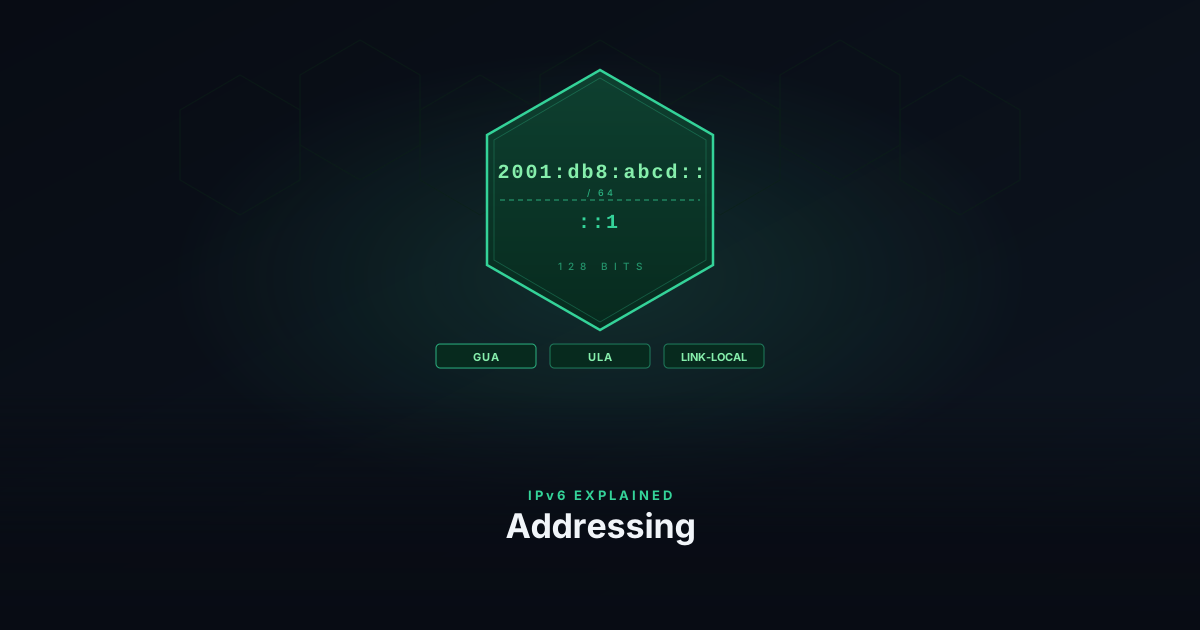
IPv4 uses 32-bit addresses. That gives roughly 4.3 billion unique values — a number that made sense in 1981 and became a serious problem by the 2000s. IANA exhausted its IPv4 pool in 2011. IPv6 uses 128-bit addresses, which provides 340 undecillion unique values — roughly 4×10²⁸ addresses per person on Earth, or about 6,700 addresses for every atom on Earth’s surface.
The address space alone justifies the switch. But IPv6 also simplifies how addresses are assigned and structured, and drops some IPv4 assumptions — like NAT — that accumulated as workarounds to exhaustion.
Notation
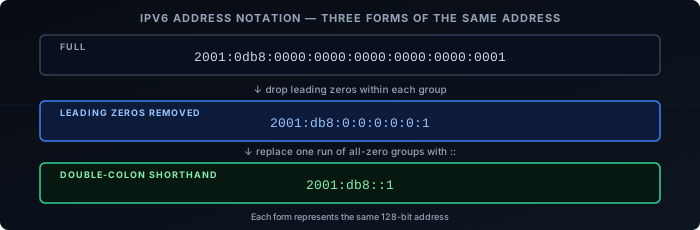
An IPv6 address is 128 bits written as eight groups of four hexadecimal digits, separated by colons:
2001:0db8:0000:0000:0000:0000:0000:0001Two shortening rules apply. First, leading zeros within each group can be dropped:
2001:db8:0:0:0:0:0:1Second, one contiguous run of all-zero groups can be replaced with :::
2001:db8::1The :: can only appear once in an address. ::1 is the loopback address (equivalent to 127.0.0.1). :: alone is the unspecified address.
Address Types
IPv6 has no broadcast. Instead it has three address types:
Unicast — identifies a single interface. Packets delivered to exactly one destination. The common case.
Multicast — identifies a group of interfaces. Packets delivered to all members of the group. Replaces broadcast for most purposes and underpins Neighbor Discovery.
Anycast — the same address assigned to multiple interfaces. Packets routed to whichever interface is topologically nearest. Used for DNS root servers and CDN infrastructure.
Scope and Address Ranges
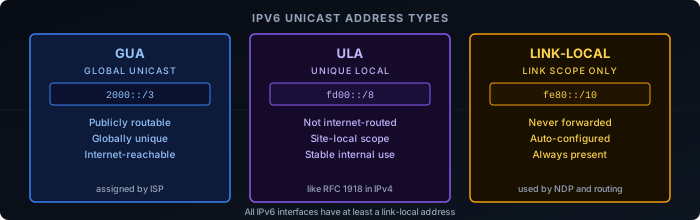
Not all unicast addresses are the same. IPv6 defines several ranges with different scopes:
Global Unicast Addresses (GUA) — publicly routable, globally unique. The 2000::/3 block covers most of this range. These are what devices use to communicate on the internet. ISPs assign GUA prefixes to home and business networks.
Unique Local Addresses (ULA) — private, not routed on the internet. The fc00::/7 range (in practice fd00::/8). Equivalent to RFC 1918 space in IPv4 (192.168.x.x, 10.x.x.x). Use these for internal services that should never be reachable from outside.
Link-Local Addresses — valid only on a single link (network segment), never forwarded by routers. Always start with fe80::/10. Every IPv6 interface has one automatically — they’re used for router discovery and Neighbor Discovery Protocol before any other address is configured.
Documentation prefix — 2001:db8::/32 is reserved by IANA (RFC 3849) exclusively for documentation and examples. It is never routed on the internet. All address examples throughout this series use 2001:db8:: addresses for this reason — they cannot be confused with real addresses.
Address Structure
A GUA address has two parts: a network prefix and an interface identifier.
| <-- 64 bits prefix --> | <-- 64 bits interface ID --> |
2001:db8:1234:abcd : 0201:c0ff:fee0:1234The prefix identifies the network — assigned by the ISP down to the router, then subdivided per subnet. The interface identifier uniquely identifies the device within that network.
The /64 boundary is the standard subnet size in IPv6. Routers are not expected to subnet below /64 (with few exceptions). This means every IPv6 subnet has 2⁶⁴ addresses — more than enough that address conservation within a subnet is irrelevant.
Interface Identifiers
The interface identifier can be generated several ways:
EUI-64 — derived from the device’s MAC address. The 48-bit MAC is split in two, fffe is inserted in the middle, and bit 6 of the first byte is flipped (the Universal/Local bit, signalling the address was derived from a MAC). This produces a globally unique 64-bit identifier — but also embeds the MAC, which is a privacy concern.
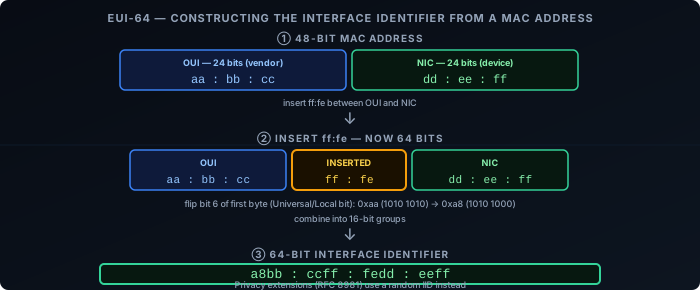
Privacy extensions (RFC 8981) — the interface ID is randomly generated and rotated periodically. Most modern operating systems use this by default for outbound connections to prevent tracking across networks.
Manual / static — set explicitly. Common on routers, servers, and infrastructure where a stable address matters.
Subnetting
ISPs typically hand a /48 or /56 prefix to a customer. The bits between the ISP’s prefix and /64 are yours to allocate as subnets.
With a /48, you have 16 bits of subnet space — 65,536 possible /64 subnets. With a /56, you have 8 bits — 256 subnets. Either is enough for any homelab or small business, with room to spare.
ISP assigns:   2001:db8:abcd::/48
Your subnets:  2001:db8:abcd:0001::/64  ← VLAN 1
               2001:db8:abcd:0002::/64  ← VLAN 2
               2001:db8:abcd:0003::/64  ← VLAN 3
...The notation /64 after the address specifies the prefix length — how many bits are the network part. Everything after is the interface ID.
Packet Header
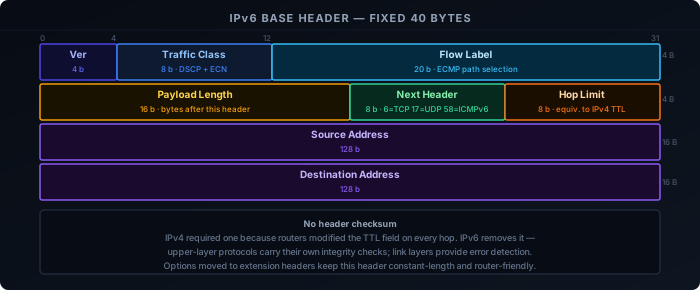
The IPv6 base header is fixed at 40 bytes. Unlike IPv4 — which has a variable-length header with an options field — all options in IPv6 are pushed into extension headers, keeping the base header constant-length and router-friendly.
| Field | Bits | Description |
|---|---|---|
| Version | 4 | Always 6 |
| Traffic Class | 8 | Upper 6 bits: DSCP (QoS marking). Lower 2 bits: ECN (Explicit Congestion Notification). Equivalent to the IPv4 DS field. |
| Flow Label | 20 | Identifies a flow between source and destination. Routers use it for consistent ECMP path selection without inspecting upper-layer headers. |
| Payload Length | 16 | Length of everything after the 40-byte header, in bytes. Does not include the header itself. |
| Next Header | 8 | Type of the next header — either an extension header or an upper-layer protocol (6=TCP, 17=UDP, 58=ICMPv6). |
| Hop Limit | 8 | Decremented by each router. Packet dropped and ICMPv6 Time Exceeded sent when it reaches zero. Equivalent to IPv4’s TTL. |
| Source Address | 128 | — |
| Destination Address | 128 | — |
There is no header checksum. IPv4 included one because routers modified the TTL field in transit, requiring recomputation at every hop. IPv6’s Hop Limit fills the same role but without a checksum — upper-layer protocols carry their own integrity checks, and link layers provide error detection.
Extension Headers
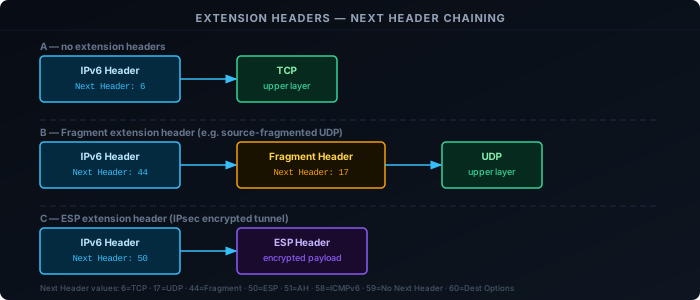
IPv6 replaces the IPv4 options field with extension headers — additional headers chained between the base header and the upper-layer protocol. Each header identifies the next via its own Next Header field, forming a linked list that terminates at the upper-layer protocol or at Next Header 59 (No Next Header).
| Next Header | Extension Header | Purpose |
|---|---|---|
| 0 | Hop-by-Hop Options | Processed by every router on the path. Rarely used — per-hop processing is expensive and many operators drop these packets at the border as a DoS precaution. |
| 43 | Routing | Specifies intermediate nodes the packet must traverse. Type 0 (RH0) was deprecated (RFC 5095) due to DoS amplification. Type 2 is used in Mobile IPv6. |
| 44 | Fragment | Carries fragmentation state when the source has split a packet that exceeds path MTU. Routers never fragment — only sources do. |
| 50 | ESP | IPsec Encapsulating Security Payload — encryption. |
| 51 | AH | IPsec Authentication Header — integrity and origin authentication without encryption. |
| 60 | Destination Options | Processed only by the final destination. |
| 59 | No Next Header | Marks the end of the chain — no upper-layer payload follows. |
Extension headers must appear in the order listed above, as defined by RFC 8200. In practice, the only ones commonly encountered are Fragment (source fragmentation and PMTUD) and ESP/AH (VPN traffic). Hop-by-Hop Options is the most restricted: because every router on the path must process it, it has been used as a DoS amplification vector and is widely filtered at network borders.