
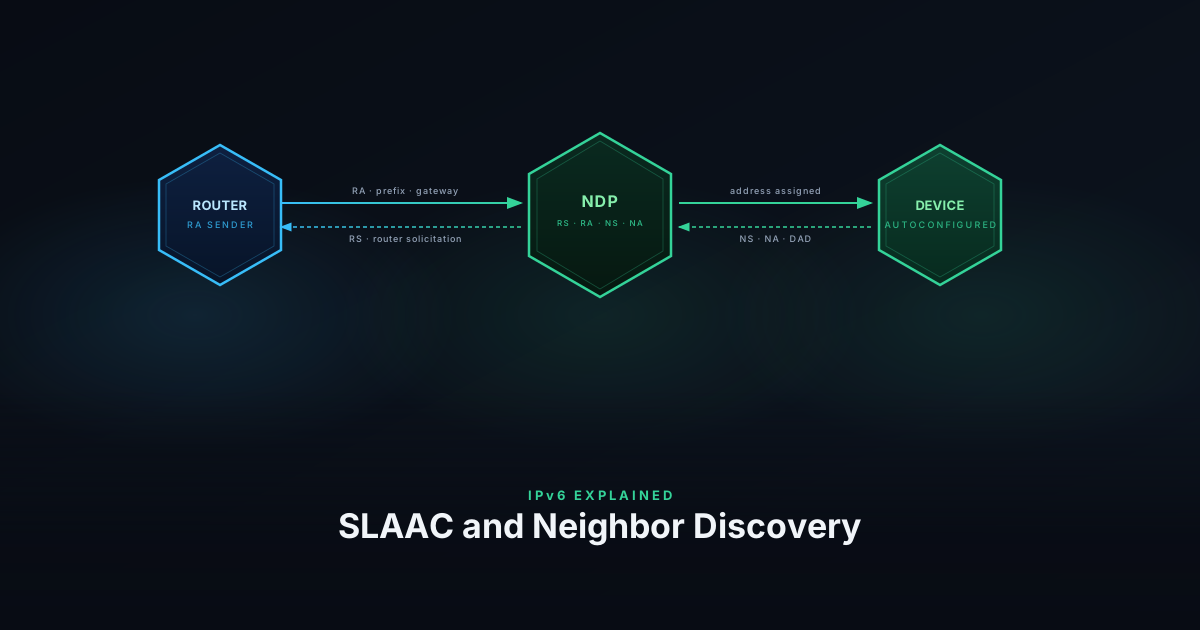
IPv4 needed two separate protocols to get a device onto a network: ARP to resolve layer-2 addresses, and DHCP to assign an IP. IPv6 replaces both with a single unified system — the Neighbor Discovery Protocol (NDP), defined in RFC 4861 . SLAAC (Stateless Address Autoconfiguration) is built on top of NDP, and DHCPv6 extends it where stateful assignment is needed.
NDP Message Types
NDP defines five ICMPv6 message types, each with a distinct role:
Router Solicitation (RS, type 133) — sent by a host when an interface comes up, asking routers on the link to announce themselves immediately rather than waiting for the next scheduled advertisement.
Router Advertisement (RA, type 134) — sent periodically by routers, and in response to RS messages. Carries the network prefix, default gateway address, MTU, and flags controlling how clients should configure addresses (SLAAC, DHCPv6, or both).
Neighbor Solicitation (NS, type 135) — sent to resolve an IPv6 address to a MAC address. The NDP equivalent of an ARP request. Also used for Duplicate Address Detection.
Neighbor Advertisement (NA, type 136) — the reply to an NS, carrying the sender’s MAC address. Also sent unsolicited when a node’s address or reachability status changes.
Redirect (type 137) — sent by a router to inform a host of a better first-hop for a particular destination. Same function as the ICMP Redirect in IPv4.
SLAAC
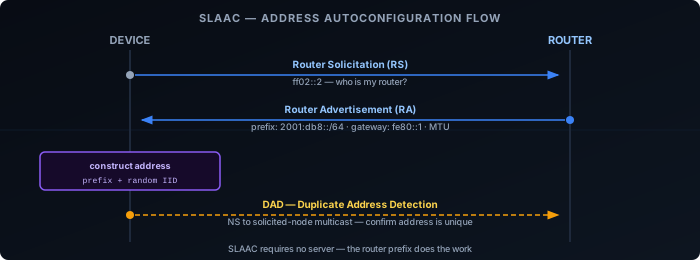
SLAAC proceeds through four steps, all without a server:
Generate a link-local address — the device forms a
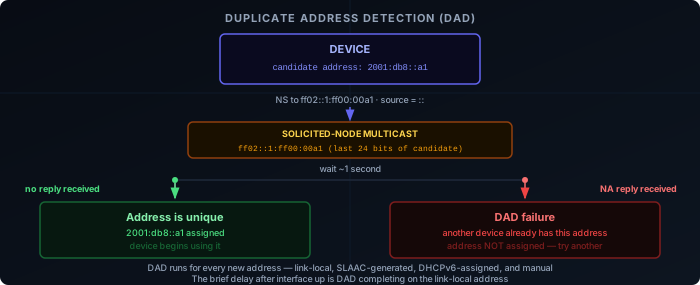
fe80::/10address using a self-generated interface identifier (EUI-64 or random). This requires nothing from the network and is ready immediately after the interface comes up.Duplicate Address Detection (DAD) — before using the link-local address, the device sends a Neighbor Solicitation (NS) with the unspecified address (
::) as source, targeting the candidate address. If no reply arrives within a short timeout, the address is unique and confirmed for use. DAD repeats for every new address.Router Solicitation (RS) — with a confirmed link-local address, the device sends an RS to
ff02::2(all-routers multicast), asking any router on the link to identify itself.Router Advertisement (RA) and address construction — the router replies with an RA containing the network prefix (e.g.
2001:db8::/64), its own link-local address as the default gateway, and MTU. The device combines the prefix with its self-generated interface identifier to form a full 128-bit global unicast address, then runs DAD again before using it.
No server is needed for any of this. The router also sends its own link-local address as the default gateway, so the device can reach the internet as soon as address construction and DAD complete.
Routers also send periodic unsolicited RAs — RFC 4861 specifies the interval is chosen randomly between MinRtrAdvInterval (default 200 s) and MaxRtrAdvInterval (default 600 s) to prevent synchronisation across devices. A device that receives an RA with a lifetime of zero treats that router as no longer available.
RA Flags
The RA carries two sets of flags. The router-level flags control which address mechanism to use:
- M flag (Managed) — use DHCPv6 for address assignment
- O flag (Other) — use DHCPv6 for other configuration (DNS, domain search) but not addresses
With both flags unset, pure SLAAC is in effect.
Each prefix in the RA is carried in a Prefix Information Option (PIO), which has its own per-prefix flags:
- A flag (Autonomous) — if set, the device may use this prefix to form a SLAAC address. If unset, the prefix is advertised but SLAAC does not trigger for it.
- L flag (on-link) — if set, the prefix is declared on-link: the device can communicate directly with other addresses in this prefix without going through the router. If unset, the device sends all traffic — even to addresses in the same prefix — via the default gateway.
- P flag (DHCPv6-PD Preferred) — if set, the network prefers that the device request a full delegated prefix via DHCPv6-PD rather than using SLAAC or individual DHCPv6 address assignment. Defined in RFC 9762, this is aimed at modern deployments where every device can receive its own
/64. Networks that set the P flag often also set M or O to support devices that don’t implement RFC 9762.
The A and L flags default to 1 in most deployments and can be set independently: a prefix can be advertised as on-link without triggering SLAAC (A=0, L=1), or used for SLAAC without being on-link (A=1, L=0). The M and O flags tell the device how to get an address; the A flag controls whether this prefix is used for SLAAC; the P flag signals that the network prefers delegation over individual address assignment.
Each PIO also carries two lifetimes that control how long an address formed from the prefix remains usable:
- Valid lifetime — how long the address is valid at all. After expiry it is removed entirely. RFC 4861 defaults to 30 days.
- Preferred lifetime — how long the address is preferred for new outgoing connections. Must be ≤ valid lifetime. Once the preferred lifetime expires, the address enters a deprecated state: existing connections continue using it, but the OS will not pick it as the source for new connections.
The distinction matters during prefix changes. When an ISP rotates the delegated prefix, the router advertises the old prefix with a shortened preferred lifetime (so devices stop initiating new connections from it) while keeping it valid long enough for existing sessions to drain — simultaneously advertising the new prefix normally. This produces a graceful handover rather than an abrupt address invalidation.
Interface Identifier in SLAAC
SLAAC lets the device choose how it generates the interface ID — EUI-64 (derived from the MAC) or a random privacy-extension address (RFC 8981). The mechanics and trade-offs are covered in Addressing; the short version is that most operating systems default to random, periodically rotated IDs for outbound connections.
DHCPv6
DHCPv6 works similarly to DHCPv4 in structure — client sends a Solicit, server replies with an Advertise, client sends a Request, server confirms with a Reply — but there are meaningful differences.
Stateful DHCPv6 assigns addresses from a pool, just like DHCPv4. The server tracks which device has which address. This is what the M flag in the RA triggers.
Stateless DHCPv6 doesn’t assign addresses. The device uses SLAAC for its address, but contacts DHCPv6 to get DNS servers and other options. This is what the O flag triggers. It’s very common — SLAAC handles the address, DHCPv6 handles the configuration.
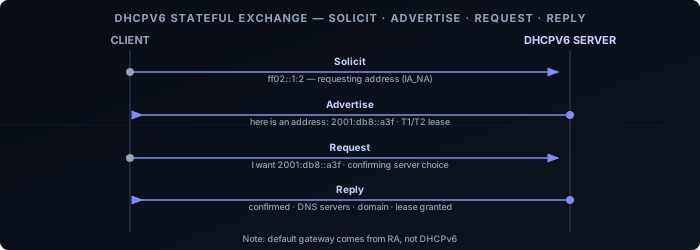
One important difference from DHCPv4: DHCPv6 does not carry the default gateway. That information comes only from Router Advertisements. This means even on a network using stateful DHCPv6 for addresses, the router still needs to send RAs for gateway discovery.
RDNSS
RDNSS (Recursive DNS Server option, RFC 8106 ) carries DNS resolver addresses directly in Router Advertisements, without any DHCPv6 exchange. The RA includes one or more IPv6 addresses of DNS resolvers, each with a lifetime indicating how long the entry should be trusted. A related option, DNSSL (DNS Search List), carries the domain search list the same way.
This makes pure SLAAC deployments viable end-to-end: the device gets its address via SLAAC and its DNS resolvers via RDNSS, with no server of any kind required.
RDNSS has one operational limitation compared to DHCPv6: it cannot push updates between RA intervals. A DNS change must wait for the next scheduled RA (up to MaxRtrAdvInterval, default 600 s) or until a client sends an RS. DHCPv6 can push a change immediately. In practice this rarely matters, but it is worth knowing when troubleshooting DNS propagation on pure-SLAAC networks.
Address Resolution
When a device wants to send a packet to another IPv6 address on the same link, it needs the destination’s MAC address. NDP handles this with NS and NA:
- The sender computes the solicited-node multicast address for the target:
ff02::1:fffollowed by the last 24 bits of the target’s IPv6 address. - It sends a Neighbor Solicitation to that multicast address, asking for the target’s MAC.
- The target — and only the target — is listening on that multicast address. It replies with a Neighbor Advertisement containing its MAC.
The solicited-node multicast address is the key improvement over ARP broadcast. Instead of every device processing the request, only devices whose address matches the last 24 bits receive it. On a large segment this significantly reduces interrupt load. The structure of solicited-node multicast addresses — and how they map to switch-level forwarding — is covered in Multicast and MLD.
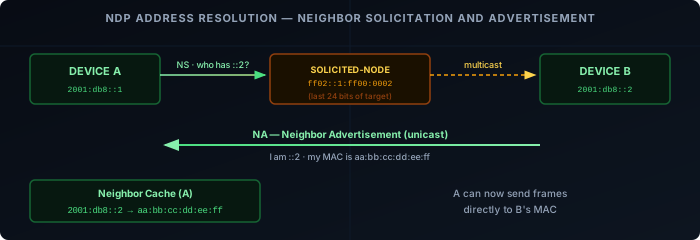
Resolved mappings are stored in the neighbor cache, equivalent to ARP’s cache. Entries have states: Incomplete, Reachable, Stale, Delay, Probe. A STALE entry can still be used for sending immediately — it is not discarded. Using a STALE entry starts a DELAY timer (5 seconds). If no upper-layer reachability confirmation arrives (e.g., a TCP ACK confirming the path is live), the entry moves to PROBE state and the device sends Neighbor Solicitations to actively verify the neighbor is still reachable. Only if those probes go unanswered is the entry removed.
Duplicate Address Detection
DAD applies to every new unicast address — SLAAC-generated, DHCPv6-assigned, or manually configured — not just the link-local address covered in step 2 above. The brief delay visible between interface up and address availability is DAD in progress. If a conflict is detected (another device replies with a NA), the address is abandoned and not used.
NDP vs ARP
| ARP | NDP | |
|---|---|---|
| Layer | IPv4 | IPv6 (ICMPv6) |
| Mechanism | Broadcast | Solicited-node multicast |
| Router discovery | Separate (DHCP / manual) | Built-in (RS/RA) |
| Address conflict detection | Gratuitous ARP (optional) | DAD (mandatory) |
| Authentication | None | Optional (SEND) |
| Scope | Link-local | Link-local |
The multicast model means NDP is quieter than ARP on large segments — each NS reaches at most a small fraction of devices. It also means IPv6 is more dependent on multicast working correctly on the underlying network. Switches and wireless APs that filter multicast aggressively can break NDP.
Source Address Selection
A device with multiple IPv6 addresses — which is the norm, not the exception — must choose which one to use as the source for each outgoing connection. RFC 6724 defines the default address selection algorithm that operating systems implement.
The algorithm works through a ranked list of preference rules. The most impactful in practice:
- Same scope wins — prefer an address whose scope matches the destination. Link-local addresses are preferred for link-local destinations; global addresses for global destinations.
- Prefix match wins — if one candidate address shares a longer prefix with the destination, prefer it. This avoids routing asymmetry where traffic leaves via one path but replies arrive via another.
- Preferred over deprecated — a deprecated address (past its preferred lifetime) loses to a currently preferred one.
- Temporary over public — for outbound connections, a temporary (RFC 8981) address is preferred over a stable public one to limit trackability.
In practice: a host with both a GUA and a ULA will use its GUA for internet traffic and its ULA for destinations within the ULA prefix — provided routing is correct. Source address selection does not substitute for routing; if no route to a ULA destination exists, the algorithm may still select a GUA source and the packet will be misrouted or dropped.
On dual-stack hosts, the algorithm also ranks IPv6 against IPv4 candidates. IPv6 is strongly preferred when a AAAA record exists, because the IPv6 source and IPv6 destination are a same-family (same-scope) match — which ranks higher than an IPv4 address paired with an IPv6 destination. This is the mechanism behind Happy Eyeballs and why dual-stack hosts reach dual-stack servers over IPv6 by default.
SLAAC vs DHCPv6
| SLAAC | Stateless DHCPv6 | Stateful DHCPv6 | |
|---|---|---|---|
| Address source | Self-generated | Self-generated | Server-assigned |
| DNS / options | From RA (RDNSS) or DHCPv6 | From DHCPv6 | From DHCPv6 |
| Default gateway | From RA | From RA | From RA |
| Server required | No | Yes | Yes |
| Address log | No | No | Yes |
The absence of an address log is the most operationally significant difference. With SLAAC, there’s no central record of which device has which address unless you’re collecting RA or NDP data separately. For networks where address-to-device mapping matters (audit, security), stateful DHCPv6 or NDP logging is needed.