
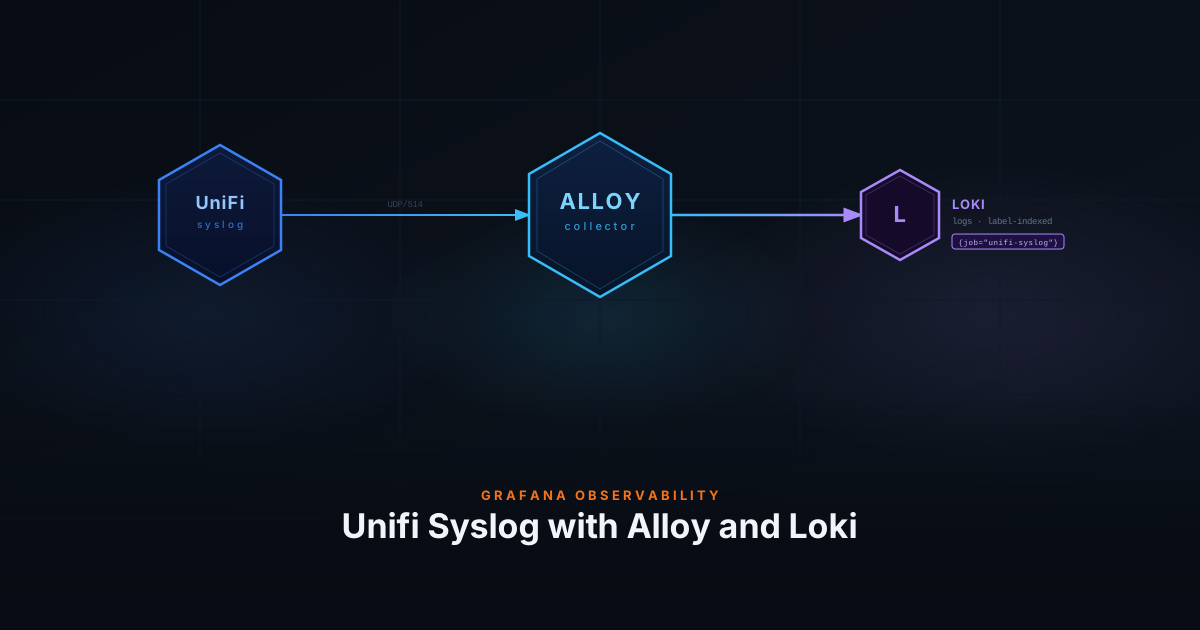
Unifi network devices generate valuable logs that can help you troubleshoot network issues and monitor your devices. By sending these syslog messages to Loki using Grafana Alloy, you can centralize your network logs alongside your application logs for unified observability.
This guide we will only focus on device logs. Securtiy and firewall logs are out of scope.
Prerequisites
- Grafana Alloy installed (or can be deployed via Docker)
- Grafana and Loki instance running (see my Log Monitoring with Grafana Alloy and Loki post)
- Unifi Controller with network devices configured
Why Grafana Alloy?
Grafana Alloy is the next-generation telemetry collector that replaces Promtail. It supports multiple data formats including logs, metrics, traces, and profiles. For syslog collection, Alloy provides:
- Native syslog receiver (no need for external syslog daemons)
- Powerful log processing and relabeling capabilities
- Lower resource usage compared to traditional collectors
- Unified configuration for all telemetry types
Setup Grafana Alloy
First, create a folder to hold the Docker Compose file and Alloy configuration:
mkdir alloyCreate the Docker Compose file:
nano alloy/docker-compose.ymlPaste the following content:
services:
  alloy:
    image: grafana/alloy:latest
    container_name: alloy
    restart: unless-stopped
    environment:
      - TZ=Europe/Amsterdam
    ports:
      - "12345:12345"
      - "514:514/udp"  # Syslog UDP
    volumes:
      - ./config.alloy:/etc/alloy/config.alloy:ro
      - alloy-data:/var/lib/alloy/data
    command:
      - run
      - --server.http.listen-addr=0.0.0.0:12345
      - --storage.path=/var/lib/alloy/data
      - /etc/alloy/config.alloy
    networks:
      - backend

networks:
  backend:
    name: backend

volumes:
  alloy-data:
name: alloy-dataConfigure Alloy for Syslog
Create the Alloy configuration file:
nano alloy/config.alloyPaste the following configuration:
/* UniFi Syslog (RFC3164) - Relabel rules to capture syslog metadata */
loki.relabel "unifi_syslog" {
  forward_to = []

  // Copy severity first (for error, debug, or unknown values)
  rule {
    source_labels = ["__syslog_message_severity"]
    target_label  = "detected_level"
  }
  // Then normalize specific values (these overwrite the above)
  rule {
    source_labels = ["__syslog_message_severity"]
    regex         = "(?i)^(emergency|alert|critical)$"
    target_label  = "detected_level"
    replacement   = "critical"
  }
  rule {
    source_labels = ["__syslog_message_severity"]
    regex         = "(?i)^warning$"
    target_label  = "detected_level"
    replacement   = "warn"
  }
  rule {
    source_labels = ["__syslog_message_severity"]
    regex         = "(?i)^(notice|informational)$"
    target_label  = "detected_level"
    replacement   = "info"
  }

  rule {
    source_labels = ["__syslog_message_hostname"]
    target_label  = "host"
  }
}

loki.source.syslog "unifi" {
  listener {
    address       = "0.0.0.0:514"
    protocol      = "udp"
    syslog_format = "rfc3164"
    use_incoming_timestamp = false
    labels        = {
      job      = "unifi",
    }
  }

  relabel_rules = loki.relabel.unifi_syslog.rules
  forward_to    = [loki.process.unifi.receiver]
}

loki.process "unifi" {
  // Extract device MAC and firmware from AP/Switch prefix: "1c6a1b3f7059,U7-Pro-Wall-8.5.21+18681: ..."
  // Gateway logs don't have this prefix — stages are no-ops for those.
  stage.regex {
    expression = `^(?P<device_mac>[0-9a-f]{12}),(?P<firmware>[^:\s]+):\s+`
  }

  stage.labels {
    values = {
      device_mac = "",
      firmware   = "",
    }
  }

  // Extract app and message from UniFi syslog content
  // Format 1 (AP/Switch): "mac,device-firmware: process[pid][pid2]: message"
  //   Example: "6c63f8863465,U7-Pro-Wall-8.3.2+18064: hostapd[5343]: wifi1ap6: STA ..."
  //   Example: "1c6a1b3f7059,...: syswrapper[2807][16721]: [configure_vap] up wifi0ap0"
  // Format 2 (Gateway): "hostname process[pid]: message"
  //   Example: "UCG-Fiber bash[2616997]: HISTORY: ..."
  stage.regex {
    expression = `^(?:[\w,\-\.\+]+:\s+|[\w\-]+\s+)?(?P<app>[\w\-]+)(?:\[\d+\])?:\s*(?P<message>.*)`
  }

  stage.labels {
    values = {
      app = "",
    }
  }

  // For stahtd lines, extract the embedded JSON payload into structured metadata
  stage.match {
    selector = `{app="stahtd"}`

    stage.regex {
      expression = `(?P<json_payload>\{.*?\})`
    }

    stage.structured_metadata {
      values = {
        json_payload = "",
      }
    }
  }

  stage.output {
    source = "message"
  }

  forward_to = [loki.write.default.receiver]
}

// Loki write endpoint
loki.write "default" {
  endpoint {
    url = "http://loki:3100/loki/api/v1/push"
  }
}Configuration Breakdown
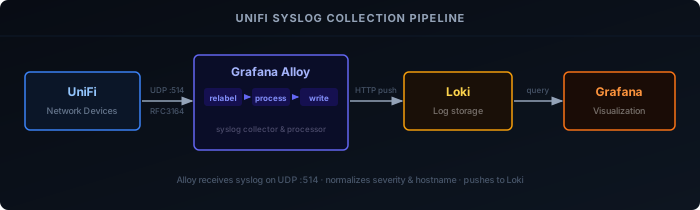
1. Relabel Rules (loki.relabel "unifi_syslog")
Runs before log processing to normalize metadata from the raw syslog headers:
detected_level: Maps RFC3164 severity words (emergency, alert, critical →critical; warning →warn; notice, informational →info) to standard Loki level labelshost: Copies the syslog hostname field so you can filter by device name
2. Syslog Listener (loki.source.syslog "unifi")
Listens on UDP port 514, parsing RFC3164 — the format UniFi devices use by default. All logs get job="unifi" as a static label, then pass through the relabel rules above before moving to the process stage.
use_incoming_timestamp is set to false so Alloy’s receive time is used instead of the device clock, which can drift.
3. Log Processing (loki.process "unifi")
This stage does the heavy lifting. UniFi devices produce two distinct log formats:
- Access Points / Switches: prefix includes MAC address and firmware version
1c6a1b3f7059,U7-Pro-Wall-8.5.21+18681: hostapd[5343]: STA connected
- Gateways: no prefix, just hostname and process
UCG-Fiber bash[2616997]: HISTORY: command run
The pipeline handles both:
- A first regex extracts
device_macandfirmwarefrom the AP/Switch prefix and promotes them to labels — gateway logs simply produce no match and skip this step. - A second regex extracts the
app(process name) and strips the cleanedmessageas the log line output. - A
stage.matchblock runs only forstahtdlogs, pulling the embedded JSON payload out into structured metadata for richer querying.
4. Loki Write (loki.write "default")
Sends batched logs to the Loki push API at http://loki:3100. Uses the Docker network name loki to reach Loki on the same backend network; retries and batching are handled automatically.
Start Alloy
Deploy the Alloy container:
docker compose -f alloy/docker-compose.yml up -dVerify Alloy is running and check the logs:
docker logs alloyYou should see messages indicating that Alloy has started and the syslog listener is active.
Configure Unifi Devices
Now configure your Unifi Controller to send syslog messages to Alloy.
Using Unifi Controller
- Open your Unifi Controller
- Navigate to Settings > Cyber Secure
- Go to to Traffic Logging
- Set Activity Logging (Syslog) to SIEM Server
- Set the IP Address to your Alloy server IP (e.g.,
192.168.1.100) - Set the Port to
514 - Click Apply Changes
Verify Log Collection
After configuring your Unifi devices, logs should start flowing to Loki within seconds.
Check in Grafana
- Open Grafana and navigate to Explore
- Select Loki as the datasource
- Run a query to see Unifi logs:
{job="unifi"}You should see syslog messages from your Unifi devices, including authentication events, DHCP assignments, wireless connections, and security events.
Example Queries
With the labels and processing configured above, you can create powerful queries to analyze your network logs.
Basic Queries
All Unifi logs:
{job="unifi"}Logs from a specific device:
{job="unifi", host="UCG-Fiber"}Logs from a specific application:
{job="unifi", app="hostapd"}Summary
With Grafana Alloy configured to receive Unifi syslog messages, you now have centralized network logging alongside your application logs in Loki. This unified observability platform makes it easier to correlate network events with application behavior, troubleshoot issues, and maintain security.
The modern Alloy architecture provides better performance and more flexible log processing compared to traditional syslog daemons, while integrating seamlessly with the Grafana ecosystem.